Tool Calling Across Any Model: Write the Loop Once, Swap the Model String
OpenRouter · · Updated
Tool calling, also called function calling, lets a model request a function in structured JSON. Your code runs the function and returns the result, and the model uses it to finish its answer. Every major provider supports a version of this, but most tutorials cover one provider, so code written against OpenAI’s guide needs a rewrite when you move to Claude. With our API you don’t rewrite anything. You write the loop once, change the model string, and keep the tool code unchanged.
This guide covers the full loop: defining a tool, sending a request, reading the tool_calls response, running the function, returning its result, and getting the final answer. You’ll then run that same code against three providers by changing one string.
Our tool calling docs list every field. This guide shows the whole process from start to finish.
Tl;dr
- One tool,
get_weather(location, unit), defined once as an OpenAI-compatible JSON schema. - One loop, shown in cURL, Python, and JavaScript/TypeScript. Send
tools, readtool_calls, execute locally, return the result, get the final answer. - One test across three models. The same loop runs against Claude, GPT, and an open-weight model, with only the model string changing. Any tool-capable model works. Support varies by model, so check it before you switch.
tool_callsis an array of JSON-string arguments, so parse each argument string and never assume a single call.
What is tool calling, and why “function calling” is the same thing
Tool calling and function calling are two names for one mechanism. You describe the function to the model with a JSON schema, a written spec of its name and inputs. The model can then ask your code to call it with specific arguments. Your code runs the function, returns the result, and the model uses that result to finish its answer.
OpenAI popularized the older name “function calling.” Most APIs now say “tool calling.” The two mean the same thing. You send the tools field, the model returns tool_calls, and we accept one OpenAI-compatible schema for Claude, GPT, and Llama, so the naming difference doesn’t change your code. This guide says “tool calling” throughout, since that’s what the API fields are named. You’ll still see “function calling” in older docs and SDKs.
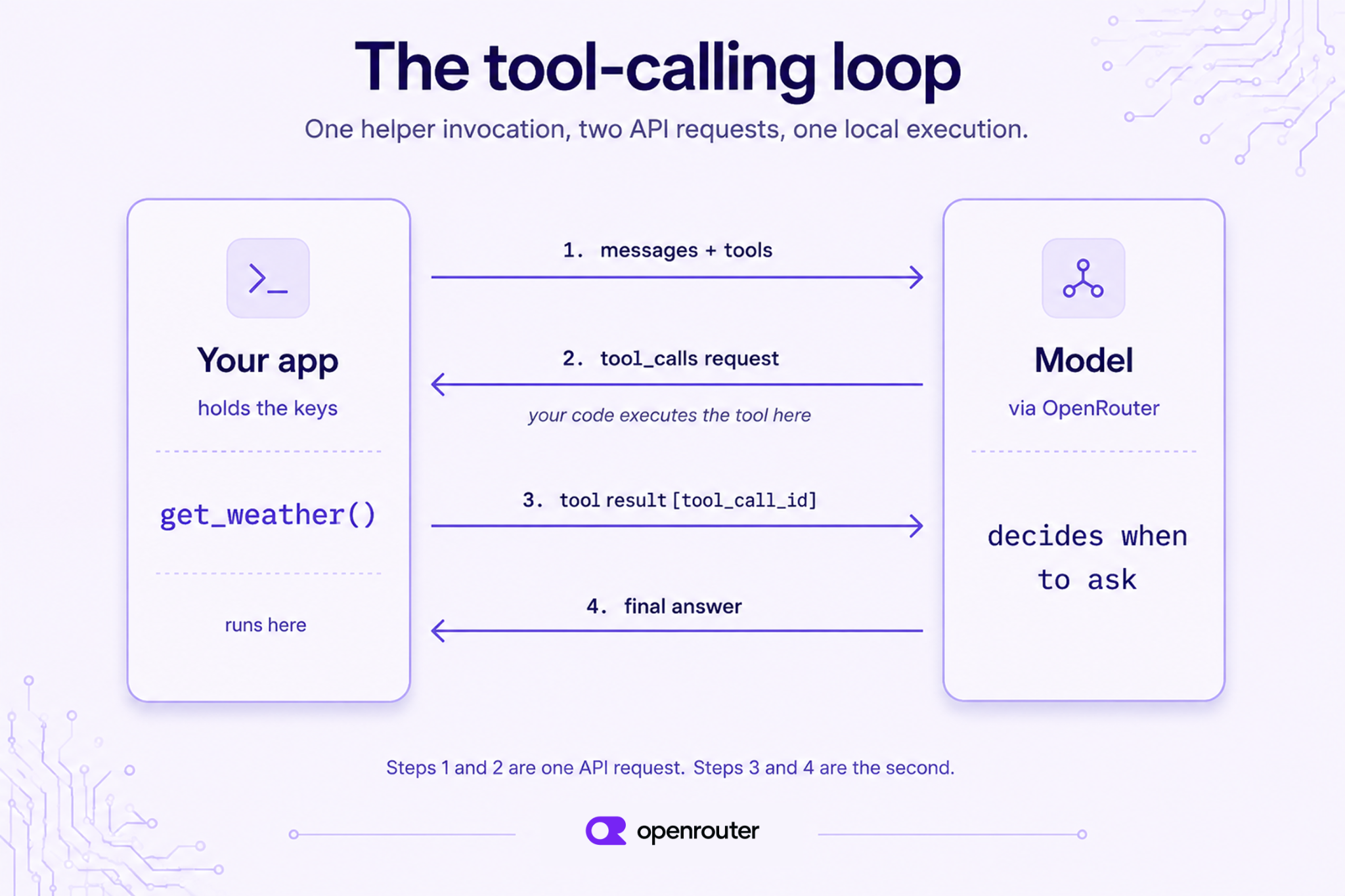
The loop has four steps:
- Send the conversation and your tool definitions.
- The model returns a
tool_callsrequest with a name and JSON arguments. - Your code runs the tool and adds the result to the conversation.
- Send the conversation again. The model reads the result and returns its final answer.
Tool calling vs. the model “running” the tool
The model never executes the tool itself. It returns a tool_calls request, and your application performs the execution.
It doesn’t call your weather API, query your database, or run your code. It sends a structured request such as get_weather(location="Paris") and stops. Your app runs the function and decides what to return. You keep control over keys, side effects, and validation. The model only decides when to ask.
Define one tool
Before you begin, you need an OpenRouter account and an API key, which you can create in the dashboard. Export it as OPENROUTER_API_KEY so the examples below can read it from the environment.
You also need one SDK: Python 3.10 or later with pip install openai, or Node 22 or later with npm install openai. Nothing else is required. The weather function returns a fixed value rather than calling a real API, so the OpenRouter key is the only key you need.
The guide uses one tool, get_weather(location, unit), in every example. Define it as an OpenAI-compatible JSON schema:
tools = [
    {
        "type": "function",
        "function": {
            "name": "get_weather",
            "description": "Get the current weather for a location.",
            "parameters": {
                "type": "object",
                "properties": {
                    "location": {
                        "type": "string",
                        "description": "City name, e.g. 'Paris'",
                    },
                    "unit": {
                        "type": "string",
                        "enum": ["celsius", "fahrenheit"],
                    },
                },
                "required": ["location"],
            },
        },
    }
]
Next, write the function the model can request. A real app would call a weather API. This one returns a fixed value so you don’t need a second key to follow along:
import json

def get_weather(location, unit="celsius"):
    # Real code would call a weather API here.
    return {"location": location, "temperature": 18, "unit": unit, "sky": "clear"}
Now point the SDK at our endpoint. We accept the OpenAI API format, so if you already use the OpenAI SDK, you can change only the base_url and the key:
import os
from openai import OpenAI

client = OpenAI(
    base_url="https://openrouter.ai/api/v1",
    api_key=os.environ["OPENROUTER_API_KEY"],
)
If you want to see the raw request before wiring up an SDK, the same first call in cURL looks like this:
curl https://openrouter.ai/api/v1/chat/completions \
  -H "Authorization: Bearer $OPENROUTER_API_KEY" \
  -H "Content-Type: application/json" \
  -d '{
    "model": "anthropic/claude-opus-4.8",
    "messages": [{"role": "user", "content": "What'\''s the weather in Paris?"}],
    "tools": [{
      "type": "function",
      "function": {
        "name": "get_weather",
        "description": "Get the current weather for a location.",
        "parameters": {
          "type": "object",
          "properties": {
            "location": {"type": "string", "description": "City name, e.g. Paris"},
            "unit": {"type": "string", "enum": ["celsius", "fahrenheit"]}
          },
          "required": ["location"]
        }
      }
    }]
  }'
The request/response loop in code
This function is the whole loop, and you won’t change it again in this guide. It sends the messages and tools, checks for tool_calls, runs each tool, appends the results, and asks the model for its final answer:
def run_tool_loop(model, user_message):
    messages = [{"role": "user", "content": user_message}]
    # First call: the model may ask for a tool.
    response = client.chat.completions.create(
        model=model, messages=messages, tools=tools,
    )
    msg = response.choices[0].message
    # No tool call? The model answered directly.
    if not msg.tool_calls:
        return msg.content
    # Append the assistant's tool-call turn verbatim, then execute each call.
    messages.append(msg)
    for call in msg.tool_calls:
        args = json.loads(call.function.arguments)  # arguments arrive as a JSON string
        result = get_weather(**args)
        messages.append({
            "role": "tool",
            "tool_call_id": call.id,
            "content": json.dumps(result),
        })
    # Second call: the model reads the tool result and writes the final answer.
    final = client.chat.completions.create(
        model=model, messages=messages, tools=tools,
    )
    return final.choices[0].message.content
Here’s the same loop in JavaScript/TypeScript for Node 22+, using the openai package pointed at our endpoint:
import OpenAI from "openai";

const client = new OpenAI({
  baseURL: "https://openrouter.ai/api/v1",
  apiKey: process.env.OPENROUTER_API_KEY,
});

// Same schema as the Python `tools` array above.
const tools = [
  {
    type: "function",
    function: {
      name: "get_weather",
      description: "Get the current weather for a location.",
      parameters: {
        type: "object",
        properties: {
          location: { type: "string", description: "City name, e.g. 'Paris'" },
          unit: { type: "string", enum: ["celsius", "fahrenheit"] },
        },
        required: ["location"],
      },
    },
  },
];

function getWeather(location, unit = "celsius") {
  return { location, temperature: 18, unit, sky: "clear" };
}

async function runToolLoop(model, userMessage) {
  const messages = [{ role: "user", content: userMessage }];
  const response = await client.chat.completions.create({ model, messages, tools });
  const msg = response.choices[0].message;
  if (!msg.tool_calls) return msg.content;

  messages.push(msg);
  for (const call of msg.tool_calls) {
    const args = JSON.parse(call.function.arguments);
    const result = getWeather(args.location, args.unit);
    messages.push({
      role: "tool",
      tool_call_id: call.id,
      content: JSON.stringify(result),
    });
  }

  const final = await client.chat.completions.create({ model, messages, tools });
  return final.choices[0].message.content;
}
Add one thing before this reaches production: arguments is a string the model generated, not a validated payload. Models sometimes return invalid JSON or invent parameters your schema never declared. Wrap the parse in error handling and check the keys against your schema before passing them to your function. The examples here skip that to keep the code short.
Everything below calls run_tool_loop or runToolLoop with a different model string.
Run it against Claude
The first run only needs a model name. Pass an Anthropic model and all four steps happen in one call to run_tool_loop:
answer = run_tool_loop(
    "anthropic/claude-opus-4.8",
    "What's the weather in Paris?",
)
print(answer)
# → "It's currently 18°C and clear in Paris."
That one call to run_tool_loop ran all four steps and made two API requests. The first request returned a tool_calls request. Your code ran get_weather and appended the result. The second request returned the finished answer.
Model slugs change between releases, so confirm the exact string on our model catalog before depending on it.
Reading the response
The function name and arguments are in the tool_calls array. In the first response, choices[0].message looks like this:
{
  "role": "assistant",
  "content": null,
  "tool_calls": [
    {
      "id": "call_abc123",
      "type": "function",
      "function": {
        "name": "get_weather",
        "arguments": "{\"location\": \"Paris\", \"unit\": \"celsius\"}"
      }
    }
  ]
}
Two details matter here. First, arguments is a JSON-encoded string, not an object, so parse it with json.loads or JSON.parse. Second, tool_calls is an array, so your code has to handle more than one call per response.
Run it against GPT
The Claude run showed the loop works. The next run shows the same code works on another provider. The only edit is one string:
answer = run_tool_loop(
    "openai/gpt-4o",
    "What's the weather in Paris?",
)
print(answer)
# → "The weather in Paris is 18°C and clear right now."
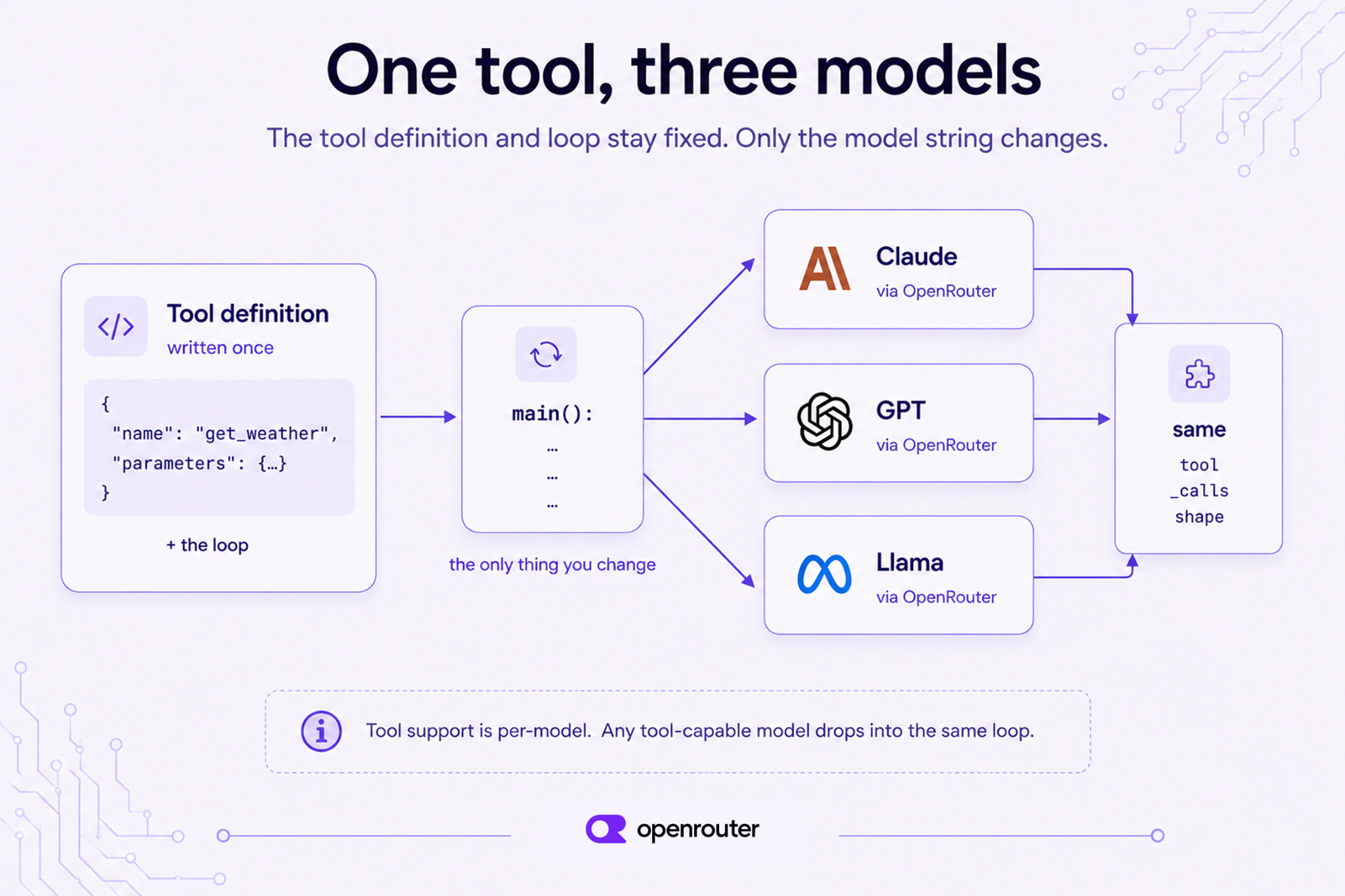
The only difference from the Claude example is anthropic/claude-opus-4.8 → openai/gpt-4o. The tool schema, the loop, the parsing, and the result message all stay the same, because we return the same tool_calls format for both. This holds for any tool-capable model. Check tool support before you switch.
Run it against an open-source model
Proprietary models often share a format, so an open-weight model is a stronger test. Change the string once more:
answer = run_tool_loop(
    "meta-llama/llama-3.3-70b-instruct",
    "What's the weather in Paris?",
)
print(answer)
# → "Right now in Paris it's 18°C with clear skies."
That’s three providers on one codebase with no rewrites. The open-weight model returns the same tool_calls structure as Claude and GPT. You can store the model name in configuration and change it in a router, a test, or a fallback without touching your tool code.
Edge cases and gotchas
The loop above covers the common case. Four things can break it in production: parallel tool calls, streaming, models without tool support, and controlling when the model calls a tool.
Parallel tool calls
Some models return multiple tool calls in a single response. A model asked about two cities may return get_weather("Paris") and get_weather("Tokyo") together. This is why the loop iterates msg.tool_calls rather than reading [0]. Your code has to append one tool result per call, each carrying its own tool_call_id, before sending the next request. The example loop already does this. You can also set parallel_tool_calls: false in the request to make the model request one tool call at a time.
Streaming tool calls
When you stream a response, tool calls arrive in pieces called deltas. The model may split the arguments string across chunks and build the tool_calls array one index at a time. Don’t run the tool before the stream ends. Collect the deltas by index, wait for the finish signal, parse the complete arguments string, and then execute.
Models that don’t support tools
Not every model supports tools. If you send tools to a model with no tool-capable endpoint, we return a 404 error stating that no endpoints support tool use. In fallback paths, a non-tool model can instead ignore the field and return plain text with no tool_calls at all. That failure produces no error, so check support before you add a model to a loop. Browse our tool-calling collection, or open any model’s page in the catalog and confirm that supported_parameters includes tools.
Forcing or disabling a tool call
Use tool_choice to control whether the model calls a tool at all:
tool_choice value | Behavior |
|---|---|
"auto" | The model decides whether to call a tool. This is the default whenever tools is present in the request. |
{"type": "function", "function": {"name": "get_weather"}} | The model must call that specific tool. |
"none" | Tool calls are blocked for this request. |
The OpenAI-compatible schema also defines "required", which asks the model to make at least one tool call. Support for the stricter values varies by model, so confirm behavior in our tool-calling docs and test against your target model before depending on it in production.
Conclusion
You defined one tool, wrote one tool-calling loop, and ran the same code against Claude, GPT, and an open-source model by changing a single string. The tool definition and the loop don’t change when the model does, so changing providers is a configuration edit, not a rewrite.
Three things to remember:
- The tool definition and the loop work across models. Write them once. We give every tool-capable model the same
toolsandtool_callsformat, so changing providers is a one-line edit. tool_callsis an array of JSON-string arguments. Loop over the array and parse each argument string. Never assume the response holds exactly one call.- Tool support varies by model. Confirm a model supports tools before you ship against it.
To use your own tool, start from the field reference in our tool calling docs and pick any model from our tool calling collection.
Frequently asked questions
What is tool calling in LLMs?
Tool calling lets a model request that your code run something on its behalf, most commonly a function. The model returns a structured JSON request naming the tool and its arguments, your application executes it, and you send the result back so the model can finish its answer. The model never executes anything itself.
What is the difference between tool calling and function calling?
There’s no functional difference, since both names refer to the same mechanism. “Function calling” is the older term, popularized by OpenAI, while “tool calling” is what most APIs use now. In our API, they map to one request/response shape, the tools field and the tool_calls field, so code written for one works for the other.
How do you implement function calling with an API?
Describe your function as a JSON schema and send it in the tools field alongside your messages. If the response contains tool_calls, parse the arguments string and run the function. Then append the result as a message carrying the matching tool_call_id and send the conversation again for the final answer.
Does tool calling work the same across different models?
Yes, for tool-capable models. We accept one OpenAI-compatible schema and return one tool_calls format for Claude, GPT, and open-weight models, so the same tool definition and loop run unchanged across them. Only the model string changes. Tool support varies by model, so confirm it per model.
Which models support tool calling?
Tool support is per-model rather than universal. Browse our tool calling collection for a curated list of tool-capable models, or open any model page in our catalog and check whether supported_parameters includes tools. If a model has no tool-capable endpoint, we return a 404 error saying no endpoints support tool use, and in fallback paths a non-tool model may ignore the field and reply in plain text.
Can open-source models do function calling?
Yes. Tool-capable open-weight models such as Llama 3.3 70B Instruct return the same tool_calls structure as proprietary models, so the same loop works without modification. Check the model’s page for tools in supported_parameters first, since support varies across open-weight families and fine-tunes.
What are parallel tool calls?
Parallel tool calls are multiple tool requests returned in a single model response, for example two get_weather calls for different cities. Your code must iterate the tool_calls array and append one result message per call, each carrying its own tool_call_id, before sending the conversation back.
References
- Tool calling docs, our canonical reference for the
toolsandtool_callsfields. - Tool calling models collection, curated tool-capable models.
- Model catalog, full listing with
supported_parametersper model. - OpenAI Python SDK, source for the
tool_choicedefault behavior and theargumentsfield type cited above.